
- Published on
Evaluating PGLite for Offline-First Maritime Applications
- Authors

- Name
- Jim Fellows
- hi@jimfellows.dev
The Challenge: Data Collection at Sea
When you're hundreds of miles offshore on a NOAA Fisheries Trawl Survey, "cloud-first" isn't an option. The internet is a luxury, not a utility. For years, our research vessels have relied on a battle-tested stack to collect critical biological and sensor data: Python (PyQt5) and SQLite.
It works. It’s robust. But as we look to the future, we're asking: can we do better?
The Contender: PGlite + React + Electron
I've been exploring PGlite as the core database for our next-generation field applications, paired with a modern UI stack: React, Material UI, and Electron.
Why Change?
- The UI Experience: PyQt5 is functional, but building rich, responsive interfaces with it feels like fighting the last war. Moving to React and Material UI opens up a massive ecosystem of components, making it easier to build intuitive tools for scientists working long shifts in rough seas.
- The Sync Story: This is the big one. Back on shore, everything lands in PostgreSQL (RDS). Currently, we have to map SQLite data types and schemas to Postgres. With PGlite, we're running actual Postgres in the browser/process. The potential to simplify the "write-path sync"—even if it requires custom replication logic—is huge. Same dialect, same types, same logic.
The Questions (and Concerns)
It's not all smooth sailing yet. Here’s what keeps me up at night regarding this switch:
1. Where is PostGIS?
For a net mensuration and GPS-heavy workflow, spatial data is first-class citizen. We need PostGIS. PGlite has announced support is coming, but for a production scientific application, "coming soon" is a risky dependency. We need to know if the WASM implementation can handle the geospatial queries we throw at it. In the mean time, in order to keep my RDS PostgreSQL compatible, I've separated my PostGIS data types into separate tables, and have converted them into geojson. This pattern adds a bit of maintenance overhead in the database, but allows me to use geospatial functionality easily in pglite while at the same time not losing PostGIS functionality server-side.
2. Performance & The Single Thread
SQLite is famous for being able to handle whatever you throw at it (within reason). PGlite, running in WASM, is currently single-threaded. When we're logging high-frequency sensor streams while simultaneously rendering a complex UI, will it choke?
3. "Battle-Tested" vs. "Bleeding Edge"
SQLite is deployed on billions of devices. PGlite is... new. For a scientific survey that costs thousands of dollars a day to operate, data loss is unacceptable.
Update: The Prototype is Live
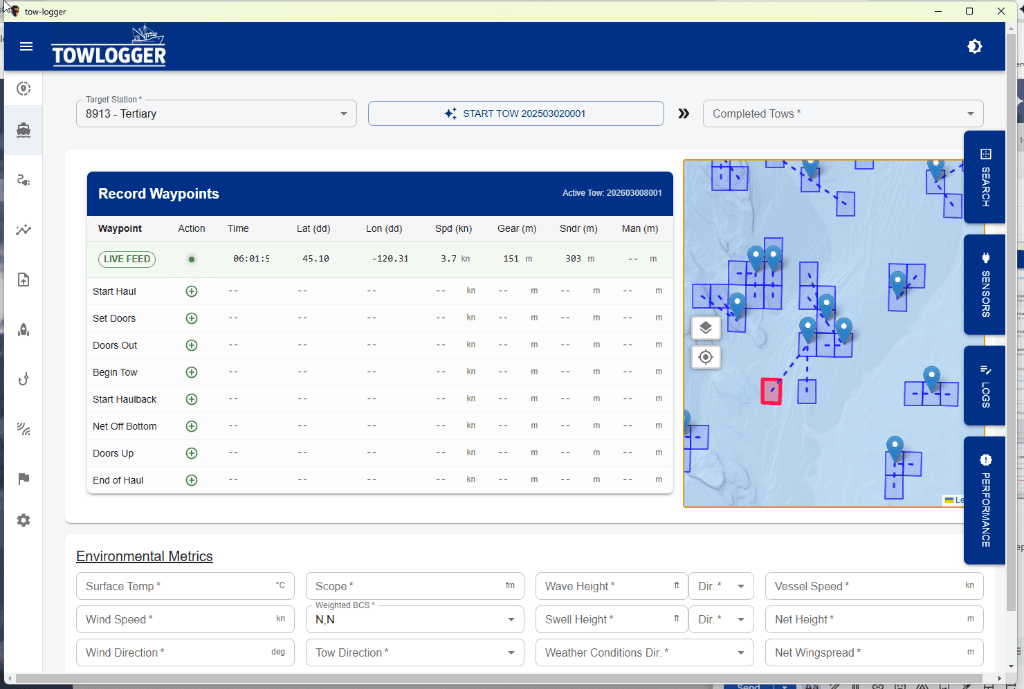
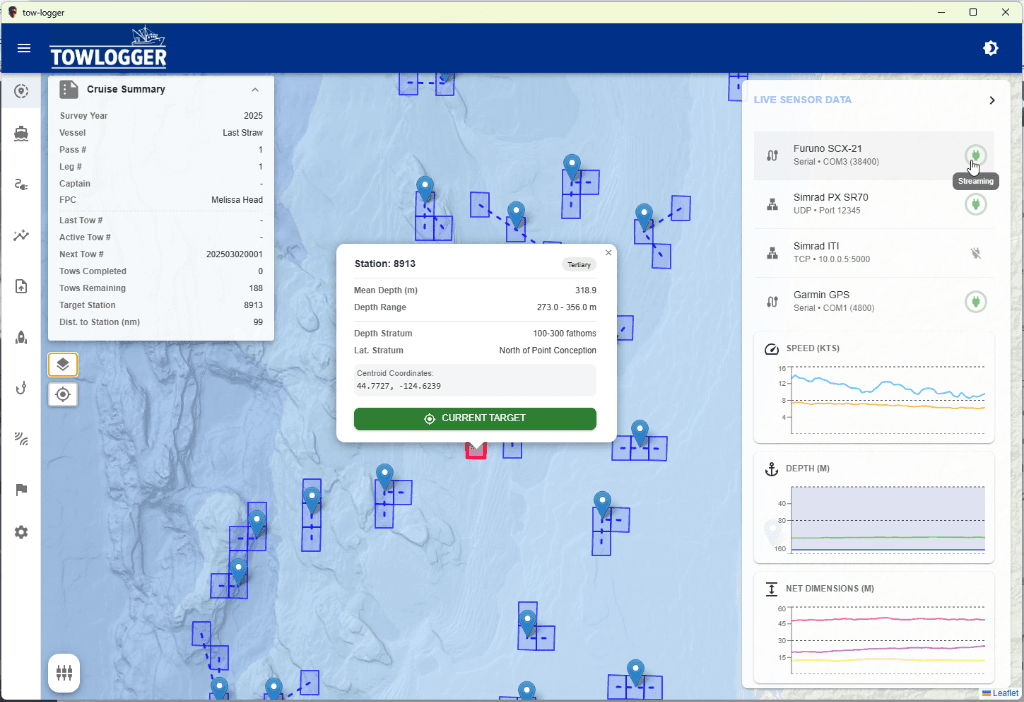
I've begun building the prototype application, a port of our teams legacy Python/Kivy app TowLogger, to testing this stack in a real-world scenario. The goal is to replace our legacy app with a modern, map-centric interface.
The Secret Weapon: Drizzle ORM
To interact with PGlite, I'm using Drizzle ORM.
If you haven't used Drizzle yet, it's a breath of fresh air compared to heavier ORMs like TypeORM or Prisma. It feels incredibly close to writing SQL, but with full TypeScript type safety.
- Migrations: Drizzle's
kithandles schema migrations effortlessly, which is critical when we're persisting data to a browser-based IndexedDB via PGlite. - Dev Workflow: Even though I haven't implemented the real-time sync with PGlite's native replication yet, the dev loop is fantastic. I can use
pg_dumpto snapshot our shoreside RDS Postgres database, and then use Drizzle's seeding tools to hydrate my local PGlite instance. This lets me develop against real production data without needing a stable internet connection.
Technical Deep Dive
Here is how we are actually managing the "Postgres in the Browser" workflow.
1. Connecting via PSQL
One of the coolest features of PGlite is that you can connect to it with standard tools while it runs in the browser (if you expose the port).
# Connect to the in-browser PGlite instance
PGSSLMODE=disable psql -h localhost -p 9876 -U postgres
Note: PGlite runs in single-user mode, so this might lock your application's connection.
2. Seeding the Database
To hydrate the local database for development without a live internet connection, we use a custom bash script that leverages pg_dump.
- Extract: Pulls connection info from our
.envfile and usespg_dumpto generate INSERT statements from the production RDS server../src/main/src/db/generate-db-seed.sh - Clean & Rebuild: When the app detects a new seed SQL file, it drops existing schemas, rebuilds extensions and functions, runs Drizzle migrations, and then executing the seed SQL.
This gives us a fresh, production-like environment every time we reset.
3. Managing Schema Changes with Drizzle
We use drizzle-kit to keep our PGlite schema in sync with our codebase.
Initial Introspection We originally pulled our schema from RDS:
npx drizzle-kit generate --config=./src/main/src/db/drizzle.rds.config.ts
Generating Migrations To update PGlite when we modify our Drizzle schema:
npx drizzle-kit generate --config ./src/main/src/db/drizzle.pglite.config.ts
This generates SQL files that the application automatically runs on boot. For complex logic (like materialized views) that Drizzle doesn't support natively, we leverage Drizzle's --custom migration generation to write raw SQL that is tracked alongside our ORM changes.
Conclusion
PGlite represents a fascinating shift. The idea of "Postgres everywhere"—from the RDS server on shore to the laptop in the ship's dry lab—is incredibly appealing. If the performance holds up and PostGIS arrives, this could be the modernize our fleet needs.